
Fight Evils with Evals!
Benchmarks measure benchmarks. Your system needs its own measures.

Every new model arrives wearing a tuxedo of benchmarks.
MMLU: 92.4%. HumanEval: 87.2%. LLeMU: 88.7%. MATH: 73.6%. AGI: 127%!
Yet, for 99% of businesses building process & product with AI, none of it matters.
What matters? How are YOUR workloads doing? Getting better or worse? The only sane way to know that is to write Evals (tests for LLMs) that reflect the specific tasks, data, and failure modes of your system.
The benchmarks are not lying. They are answering someone else’s question.
What “Vibes-Based Evaluation” Actually Costs
The standard approach: ship a model change, watch the complaint channels, roll back if the room gets loud.
That misses almost everything interesting:
You only catch loud failures. Users who get a confidently wrong answer and don’t realize it? Silent. Users who get a worse answer and abandon the feature? Silent. Support tickets and error rates capture only a fraction of quality regression.
You can’t distinguish regressions from improvements. If the new model is better at task A and worse at task B, complaints about B look identical to generic “the AI got worse” feedback. You don’t know what to fix.
You’re using your users as test infrastructure. They didn’t sign up for that.
The Eval Spectrum (and Where Most Teams Get It Wrong)
Evaluation approaches sit on a spectrum from “fast but flimsy” to “expensive but valid.”
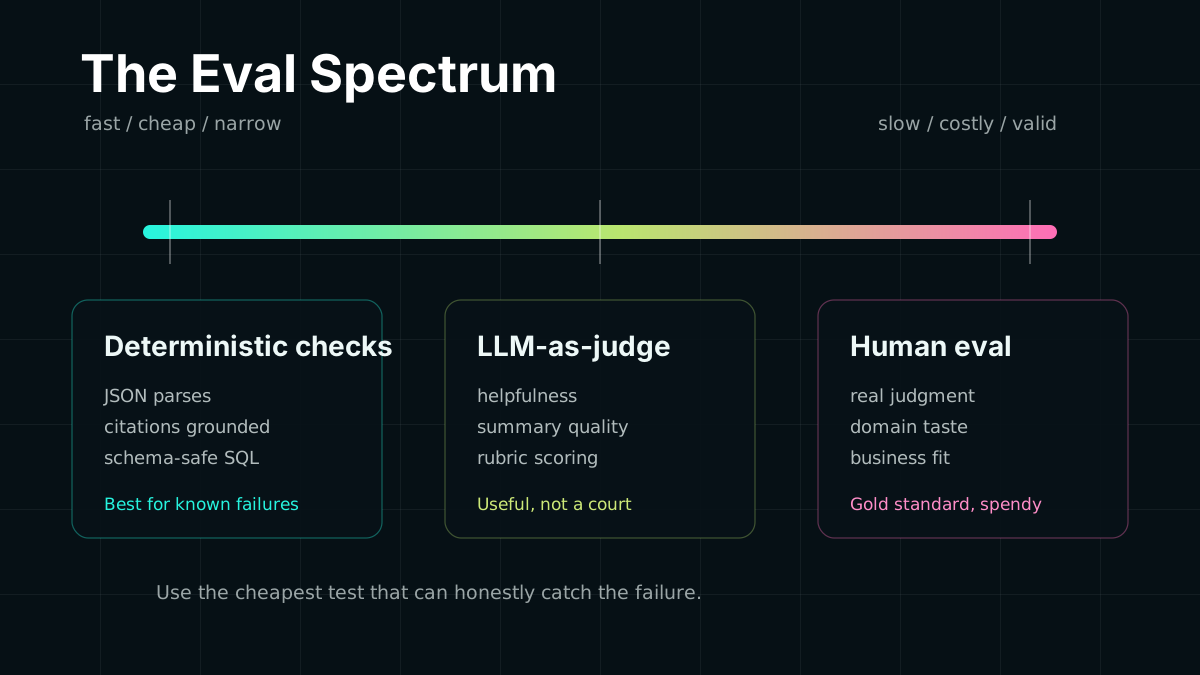
LLM-as-judge is the current darling: ask a powerful model to grade another model’s outputs. Fast, scalable, cheap. The problem: it bakes in the grader model’s biases, can be gamed, and creates a circular dependency. If you use GPT-5 to grade GPT-5’s outputs, you’re measuring something like “how much does GPT-5 agree with GPT-5.” That’s not nothing, but it’s not what you think.
Human eval is the gold standard everyone tries to skip. Getting humans to evaluate outputs is expensive, slow, inconsistent across evaluators, and annoying to schedule. But it is the only thing that validates whether your system is useful to real humans.
Task-specific automated checks are where most teams should spend more time. They are not glamorous, but they are fast, deterministic, and tied to what matters in your system.
What Actually Works
1. Define Failure Before You Ship
Before changing a model or prompt, write down what bad looks like. Specifically.
Not “the output should be accurate.” That’s not a test. More like:
- Structured JSON output must parse without errors
- All citations in the response must appear verbatim in the retrieved context
- Responses must not mention competitor product names
- SQL queries must be syntactically valid and reference only tables that exist in the schema
- Sentiment classification must not flip from positive to negative more than 3% of the time on the existing test set
You can check these programmatically. No judge model required.
Eval harness: deterministic checks
type EvalResult = { passed: boolean; reason?: string };
const evals: Record<string, (output: string, context: EvalContext) => EvalResult> = {  // JSON must parse  validJson: (output) => {    try {      JSON.parse(output);      return { passed: true };    } catch (e) {      return { passed: false, reason: `Invalid JSON: ${e.message}` };    }  },
  // No hallucinated citations — every claim must appear in context  groundedCitations: (output, { retrievedChunks }) => {    const claims = extractCitations(output);    const ungrounded = claims.filter(      (claim) => !retrievedChunks.some((chunk) => chunk.includes(claim))    );    return ungrounded.length === 0      ? { passed: true }      : { passed: false, reason: `Ungrounded claims: ${ungrounded.join(', ')}` };  },
  // Response length sanity check — catch truncation or runaway generation  reasonableLength: (output) => {    const words = output.split(/\s+/).length;    return words >= 10 && words <= 2000      ? { passed: true }      : { passed: false, reason: `Word count ${words} out of bounds` };  },};
2. Build a Golden Set From Your Worst Days
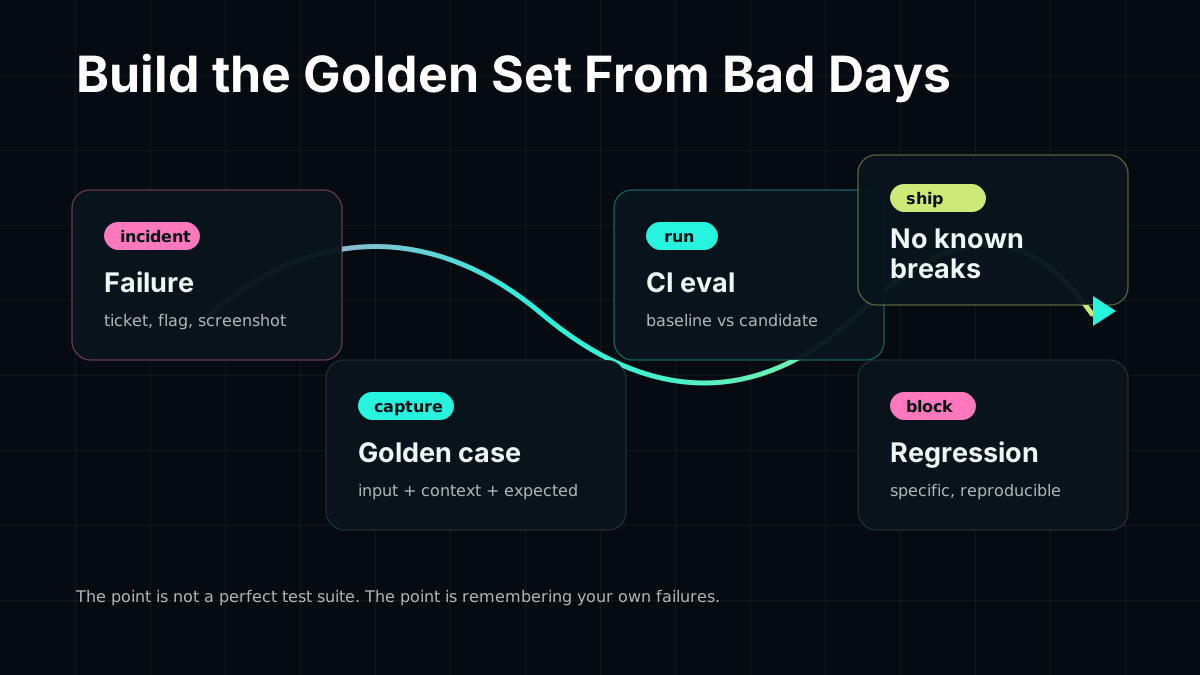
Your best evaluation data is the embarrassing stuff: the outputs that made someone file a ticket, screenshot a hallucination, or quietly stop using the feature.
Every time a user reports a bad output, flags a hallucination, or you notice a failure manually, add it to your golden set: the input, the context, and the correct behavior. Keep 50-100 cases and run them on every model change.
This feels manual at first. After six months, you have a test suite no public benchmark can game, because every case came from your own failure history.
Golden case shape
interface GoldenCase { id: string; input: string; context: Record<string, unknown>; expectedBehavior: { mustContain?: string[]; mustNotContain?: string[]; structureCheck?: (output: string) => boolean; minSimilarityToReference?: number; // cosine similarity to a reference answer }; sourceIncident?: string; // link back to the bug report or ticket}3. Regression Testing, Not Just Acceptance Testing
Most teams run evals only when considering a model change. That’s acceptance testing: “is this new thing good enough?”
You also need regression testing: “did this break something that used to work?”
Run your golden set on every prompt change, not just model changes. A prompt that was working fine can silently degrade when you add a new tool, change a RAG retrieval strategy, or update your context template. You won’t know without a baseline. Tools like Langfuse attach eval scores to production traces so regression shows up in dashboards, not just in incident reports.
Eval harness: baseline vs candidate comparison
async function compareModelVersions(  goldenCases: GoldenCase[],  baselinePipeline: Pipeline,  candidatePipeline: Pipeline) {  const results = await Promise.all(    goldenCases.map(async (tc) => {      const [baseline, candidate] = await Promise.all([        baselinePipeline.run(tc.input, tc.context),        candidatePipeline.run(tc.input, tc.context),      ]);
      return {        id: tc.id,        baselinePassed: runEvals(baseline, tc.expectedBehavior),        candidatePassed: runEvals(candidate, tc.expectedBehavior),        regression: /* baseline passed */ && /* candidate failed */,        improvement: /* baseline failed */ && /* candidate passed */,      };    })  );
  const regressions = results.filter((r) => r.regression);  const improvements = results.filter((r) => r.improvement);
  console.log(`Regressions: ${regressions.length} / ${goldenCases.length}`);  console.log(`Improvements: ${improvements.length} / ${goldenCases.length}`);
  if (regressions.length > 0) {    console.error('Blocking regressions found:');    regressions.forEach((r) => console.error(` - ${r.id}`));  }
  return { regressions, improvements };}
If a candidate regresses on known failures, the upgrade conversation gets wonderfully specific: which cases improved, which cases broke, and whether the trade is worth it.
4. Use LLM-as-Judge for Exactly One Thing
LLM-as-judge is useful for open-ended outputs where there is no deterministic right answer: “is this response helpful?”, “does this summary preserve the key points?”, “is this explanation right for a beginner?”
Use it there. Don’t use it for deterministic answers. When you do use it, make the grading rubric explicit:
Eval harness: rubric-based judge
async function judgeHelpfulness(  userQuery: string,  modelResponse: string): Promise<{ score: number; reasoning: string }> {  const judgePrompt = `You are evaluating a customer support response.
User question: ${userQuery}Response: ${modelResponse}
Rate the response on a scale of 1-5:5 = Directly answers the question with accurate, actionable information4 = Answers the question but could be more specific or actionable3 = Partially addresses the question; key information is missing2 = Tangentially related but doesn't answer the question1 = Off-topic, factually wrong, or harmful
Respond with JSON: {"score": <number>, "reasoning": "<one sentence>"}`;
  const result = await judgeModel.generate(judgePrompt);  return JSON.parse(result);}
An explicit rubric reduces evaluator variance, gives you interpretable output, and makes it easier to audit when the judge is wrong. Libraries like Autoevals and Braintrust ship prebuilt rubrics for common tasks — worth stealing before writing your own from scratch.
Tools Worth Knowing
You don’t have to build all of this from scratch. Several tools have made serious progress on the eval infrastructure problem:
Braintrust — Full eval platform with experiment tracking, dataset management, and scoring functions. Organizes eval runs by prompt, model, and deployment so you can diff quality over time, not just across releases. Pairs well with their open-source Autoevals library, which ships prebuilt model-graded scoring functions for common tasks (factual accuracy, helpfulness, toxicity, semantic similarity).
Langfuse — Open-source LLM observability that sits between your app and your models. Traces every call, attaches eval scores (human or automated) to individual spans, and surfaces quality trends over production traffic. Good choice if you want observability and evals in the same tool rather than a separate eval harness.
Evalite — TypeScript-native eval framework by Matt Pocock. Low ceremony: define a task, define a scorer, run it in your existing test setup. Targets teams who want evals that feel like unit tests rather than a separate ML experiment platform.
promptfoo — CLI-first eval runner focused on prompt comparison and red-teaming. Easy to configure via YAML, integrates with most model providers, and has built-in support for detecting prompt injection and other adversarial inputs.
deepeval — Python eval framework with a large library of built-in metrics (G-Eval, RAG faithfulness, answer relevancy, hallucination detection). Useful for RAG pipelines where you want specific grading for retrieval quality, not just generation quality.
The right tool depends on your stack and where you’re starting from. What matters more than the choice of framework is the discipline of running evals at all — consistently, on every significant change.
The Uncomfortable Part
Most teams skip this because it asks an irritating question early: what would “good” look like here?
That is genuinely hard for a new AI feature. It is also non-optional if you care about reliability. Teams that ship trustworthy AI are doing the same thing they’d do for any critical code path: define expected behavior, test it, and run those tests continuously.
The benchmarks are not lying. They are answering someone else’s question. Stop reading them as product roadmaps and start writing tests that match your system.
Your users will notice before your dashboards do. Build the test suite first.